# Webhooks
Cloud Slicer webhooks POST to your server whenever an order changes, so you do not
have to poll `GET /v1/order/{order_id}`. Delivery is asynchronous and
at-least-once: every event is signed, retried on failure, and recorded in a
durable log you can inspect and replay. Webhooks are a paid-plan feature (Pro and
Max).
## Set up in the dashboard
Most integrations only need the dashboard. Open
[Settings](https://www.cloudslicer3d.com/dashboard/settings) and find the
**Webhooks** card.
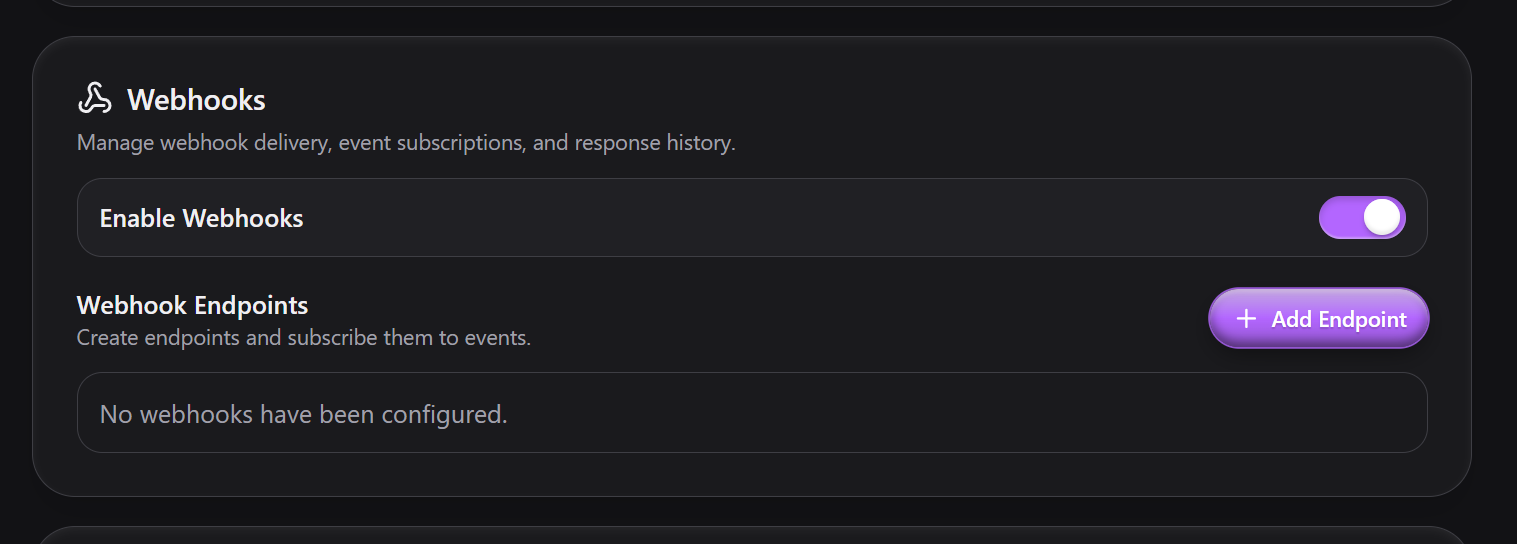 1. Turn on **Enable Webhooks**. This is the account-wide switch; no endpoint
fires while it is off.
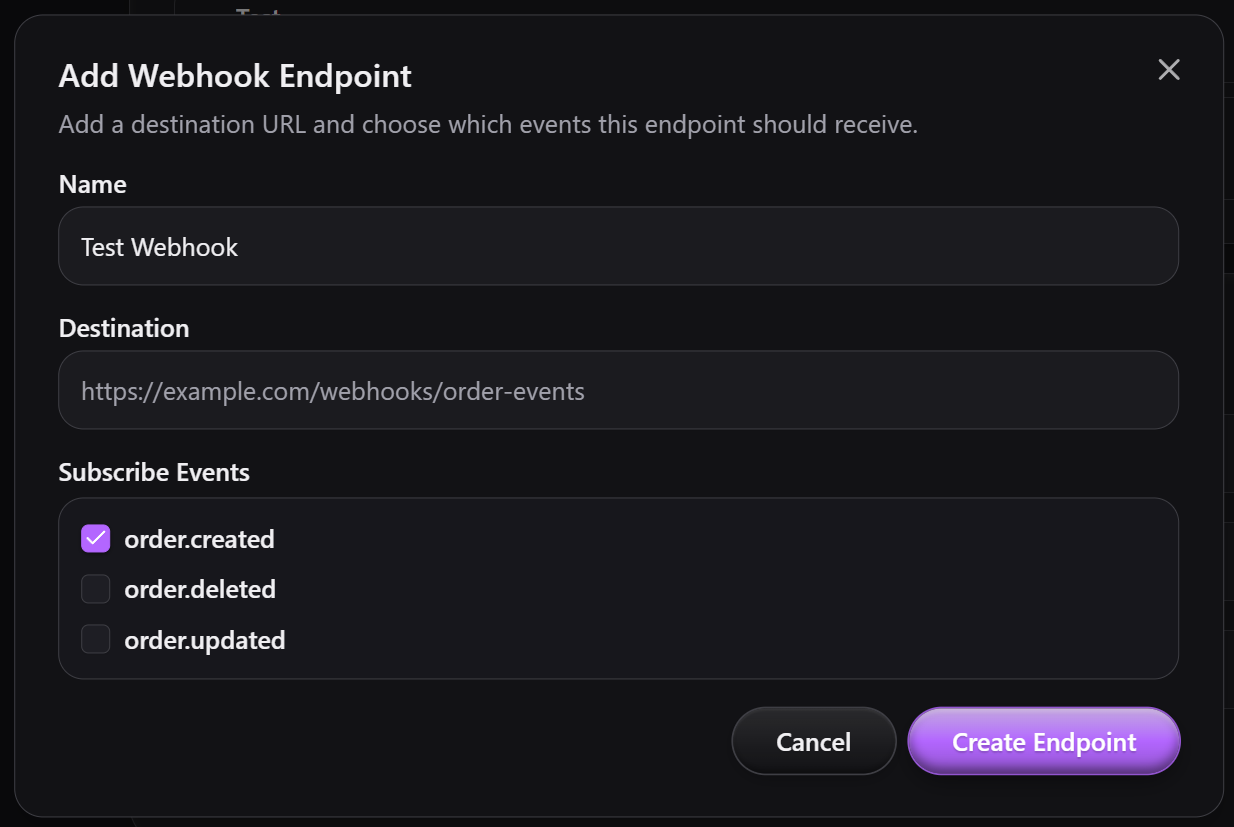
2. Click **Add Endpoint**. Give it a **Name** (a label for you), a **Destination**
(your HTTPS URL), and check the events to **Subscribe** to (`order.created`,
`order.updated`, `order.deleted`). Click **Create Endpoint**.
3. Open the endpoint to manage it. The detail view shows its **Signing Secret**,
which you copy into your receiver to verify deliveries (see
[Verify the signature](#verify-the-signature)). From here you can toggle the
endpoint **Enabled**, change its **Subscribed Events** and **Apply changes**,
or **Delete** it.
 ### Activity
The endpoint's **Activity** table is every delivery attempt, newest first: the
delivery **ID**, **Status** (`Success` or `Failed`), **HTTP Code** returned by
your server, **Event Type**, and **Timestamp**. The **Resend** action on each row
re-queues that delivery with its original payload. **Load 5 More** pages back
through older deliveries.
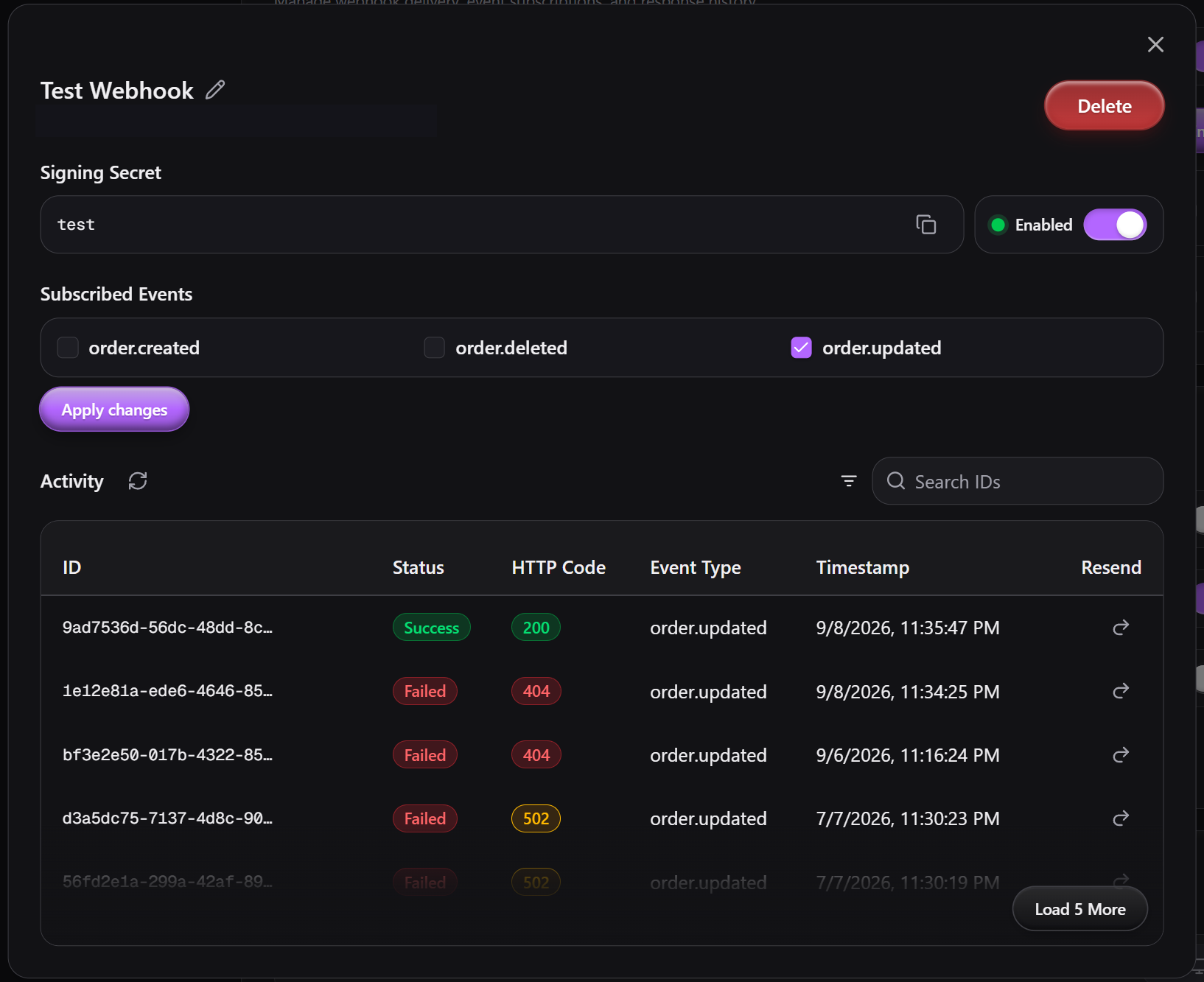 A `Failed` row with a `4xx` code means your server rejected the request; a `5xx`
or a missing code means it errored or timed out, and Cloud Slicer will retry it on
its own (see [Delivery, retries, and failures](#delivery-retries-and-failures)).
## Events
Three event types, all about orders:
- **`order.created`** fires after a new order is placed.
- **`order.updated`** fires after any field on an order changes, including a
status change to `cancelled`. A cancelled order still exists; only its `status`
moved.
- **`order.deleted`** fires after an order is deleted. This is distinct from a
cancellation: the record is gone, and `data` carries its last known state.
An endpoint receives an event only if it is in that endpoint's subscribed events,
the endpoint is enabled, and the account's **Enable Webhooks** switch is on.
## Payload
Every delivery is a JSON body with this shape:
```json
{
"data": { "order_id": "9a8b7c…", "status": "printing", "total": 214.5, "…": "…" },
"event_id": "b3f1c2…",
"event_type": "order.updated",
"occurred_at": "2026-02-14T12:34:56.789+00:00",
"order_id": "9a8b7c…"
}
```
- **`event_id`** is unique per event. Two endpoints receiving the same event share
one `event_id`, and a retry keeps it, so it is the key to dedupe on.
- **`data`** is the whole order, the same shape `GET /v1/order/{order_id}`
returns. [Orders](/guides/orders#the-order-object) documents every field,
including the grouped line items (`files`, `material`, `print_settings`,
`priority`, `addons`, `estimate`, `pricing`).
- Keys are serialized sorted with no whitespace, because the signature is computed
over these exact bytes.
Notable `data` fields:
- **`data.total`** is the final customer amount:
`subtotal - discount_amount + shipping_cost`, each rounded half-up to two
decimals. `subtotal` is the sum of each line's `pricing.line_total` plus
`order_base_fee` and `order_priority_surcharge`, the charges that belong to no
single line. Discounts (rule or code, whichever is larger) are in
`discount_amount`. There is no tax field. See
[How totals are computed](/guides/orders#how-totals-are-computed).
- **`data.priority`** is computed: under a `per_order` priority scope, the name of
the priority whose surcharge is charged; under `per_item`, `null`. Each line's
own choice is in `line_items[].priority`.
- **`data.shipping_address`** is `null` unless `data.shipping_selected` is `true`.
When set it has `first_name`, `last_name`, `company` (nullable),
`address_line1`, `address_line2` (nullable), `city_locality`, `state_region`
(nullable), `postal_code` (nullable), and `country`.
- **`data.custom_order_id`** is your human-facing order number (`{prefix}{n}`),
assigned at create time only if you have custom order IDs enabled in order
settings, otherwise `null`. It is a label. Every webhook and order API call keys
on `data.order_id`, not this value.
- **`data.customer_email`** is always present. An order cannot be placed without a
valid email, so orders never arrive without one.
- **`data.status`** is one of `new`, `in_progress`, `printing`, `completed`,
`cancelled`.
## Verify the signature
Each POST carries these headers:
- **`X-CloudSlicer-Signature-SHA256`**: HMAC-SHA256 of the raw body, hex encoded.
- **`X-CloudSlicer-Event-Id`**: matches `event_id` in the body.
- **`X-CloudSlicer-Event-Type`**: for example `order.updated`.
- **`X-CloudSlicer-Attempt`**: the attempt counter, starting at `1`.
The signature is
`HMAC_SHA256(key = signing_secret, message = raw_request_body).hexdigest()`, where
`signing_secret` is the **entire secret string** shown for the endpoint, any
`whsec_` prefix included. Compute it over the bytes you received, before any JSON
parse or re-serialization, and compare with a constant-time check.
```python
import hashlib
import hmac
from flask import Flask, request, abort
SIGNING_SECRET = "YOUR_SIGNING_SECRET" # the full string shown for the endpoint
def signature_ok(raw_body: bytes, signature_header: str) -> bool:
expected = hmac.new(
SIGNING_SECRET.encode("utf-8"),
raw_body,
hashlib.sha256,
).hexdigest()
return hmac.compare_digest(expected, signature_header)
app = Flask(__name__)
@app.post("/cloud-slicer/webhooks")
def receive():
if not signature_ok(
request.get_data(), # raw bytes, not request.json
request.headers.get("X-CloudSlicer-Signature-SHA256", ""),
):
abort(401)
event = request.get_json()
# Persist event["event_id"], enqueue work, then return fast.
return "", 200
```
```typescript
import crypto from "node:crypto";
import express from "express";
const SIGNING_SECRET = "YOUR_SIGNING_SECRET"; // the full string shown for the endpoint
function signatureOk(rawBody: Buffer, signatureHeader: string): boolean {
const expected = crypto
.createHmac("sha256", SIGNING_SECRET)
.update(rawBody)
.digest("hex");
const a = Buffer.from(expected);
const b = Buffer.from(signatureHeader);
return a.length === b.length && crypto.timingSafeEqual(a, b);
}
const app = express();
app.post(
"/cloud-slicer/webhooks",
express.raw({ type: "application/json" }), // keep the raw body for signing
(req, res) => {
const rawBody = req.body as Buffer;
if (!signatureOk(rawBody, req.header("X-CloudSlicer-Signature-SHA256") ?? "")) {
return res.sendStatus(401);
}
const event = JSON.parse(rawBody.toString("utf8"));
// Persist event.event_id, enqueue work, then return fast.
res.sendStatus(200);
},
);
```
:::note
There is no signature-scheme version header today. If the scheme changes, the new
version will be announced before it ships.
:::
## Delivery, retries, and failures
A delivery counts as **delivered on any `2xx`**. Return `2xx` as soon as you have
stored the event and do slow work afterward. A non-2xx response, a connection
error, or exceeding the 30-second per-attempt timeout is a failure.
Failed attempts retry on a fixed ladder of **1m, 5m, 30m, 2h**, for **5 attempts**
total (about 2.6 hours).
:::info
**Retried** (transient): connection errors, timeouts, and HTTP `408`, `425`,
`429`, and every `5xx` (`500`, `502`, `503`, `504`, …).
**Not retried** (terminal on the first failure): every other `4xx`, including
`400`, `401`, `403`, `404`, `409`, `410`, and `422`. These mean your endpoint
rejected the request, so replaying it would not help.
:::
A delivery that exhausts the ladder, or fails with a non-retryable code, stays
listed in **Activity** and can be replayed with **Resend**.
## Manage endpoints from the API
Everything the dashboard does is also on the API, under the same
`Authorization: Bearer` token as the rest of the API and gated to paid plans. Use
this to provision endpoints from your own tooling.
Create an endpoint with `POST /v1/webhook/endpoint`. `name` is optional and
`is_active` defaults to `true`. The response includes a `webhook_id` and the
`signing_secret`.
```bash
curl -X POST https://api.cloudslicer3d.com/v1/webhook/endpoint \
-H "Authorization: Bearer YOUR_API_TOKEN" \
-H "Content-Type: application/json" \
-d '{
"name": "Test Sync",
"endpoint_url": "https://example.com/hooks/cloud-slicer",
"subscribed_events": ["order.created", "order.updated", "order.deleted"]
}'
```
- `GET /v1/webhook/endpoints` lists your endpoints;
`GET /v1/webhook/endpoint/{webhook_id}` fetches one.
- `PATCH /v1/webhook/endpoint/{webhook_id}` updates `name`, `endpoint_url`,
`subscribed_events`, or `is_active` (all optional).
- `DELETE /v1/webhook/endpoint/{webhook_id}` removes it.
- `GET /v1/webhook/deliveries` returns every delivery, newest first, with
`status` (`pending`, `success`, `failed`), `http_code`, `attempt_count`,
`next_attempt_at`, `delivered_at`, and the stored request payload.
- `POST /v1/webhook/delivery/retry/{webhook_delivery_id}` re-queues one delivery,
reusing its original payload and `event_id`. This is the **Resend** button.
## Push order updates back to Cloud Slicer
To reflect a change made in your own system, call `PATCH /v1/order/{order_id}`
with your Bearer token:
- `order_id` is the Cloud Slicer default ID from `data.order_id`, not
`custom_order_id`.
- Body fields, all optional, at least one required: `status`, `notes`,
`deadline`, `shipping_selected`, `shipping_address`, `line_items`. The order's
`priority` is computed from the line items, so it is not an input.
- `status` accepts `new`, `in_progress`, `printing`, `completed`, `cancelled`.
There are no blocked transitions; any status can move to any other. Setting
`completed` also marks every line item `completed`. Sending `line_items` or
`shipping_selected` triggers a full server-side recompute of the line totals,
`subtotal`, `discount_amount`, `shipping_cost`, and `total` (see
[Update an order](/guides/orders#update-an-order)).
```python
import requests
BASE_URL = "https://api.cloudslicer3d.com/v1"
API_TOKEN = "YOUR_API_TOKEN"
response = requests.patch(
f"{BASE_URL}/order/{order_id}",
headers={"Authorization": f"Bearer {API_TOKEN}"},
json={"status": "printing"},
)
response.raise_for_status()
```
```typescript
const BASE_URL = "https://api.cloudslicer3d.com/v1";
const API_TOKEN = "YOUR_API_TOKEN";
const response = await fetch(`${BASE_URL}/order/${orderId}`, {
method: "PATCH",
headers: {
Authorization: `Bearer ${API_TOKEN}`,
"Content-Type": "application/json",
},
body: JSON.stringify({ status: "printing" }),
});
if (!response.ok) throw new Error(await response.text());
```
:::note
`PATCH /v1/order/{order_id}` returns a short acknowledgment (`order_id`,
`updated_at`), not the updated order. Call `GET /v1/order/{order_id}` if you need
the recomputed record.
:::
:::warning
An update through this endpoint fires `order.updated` to every subscribed
endpoint, including one that mirrors the change you just pushed. Dedupe on
`event_id`, or ignore an event whose `data` already matches your local state, to
avoid a sync loop.
:::