

Webhooks
Cloud Slicer webhooks POST to your server whenever an order changes, so you do not
have to poll GET /v1/order/{order_id}. Delivery is asynchronous and
at-least-once: every event is signed, retried on failure, and recorded in a
durable log you can inspect and replay. Webhooks are a paid-plan feature (Pro and
Max).
Set up in the dashboard
Most integrations only need the dashboard. Open Settings and find the Webhooks card.
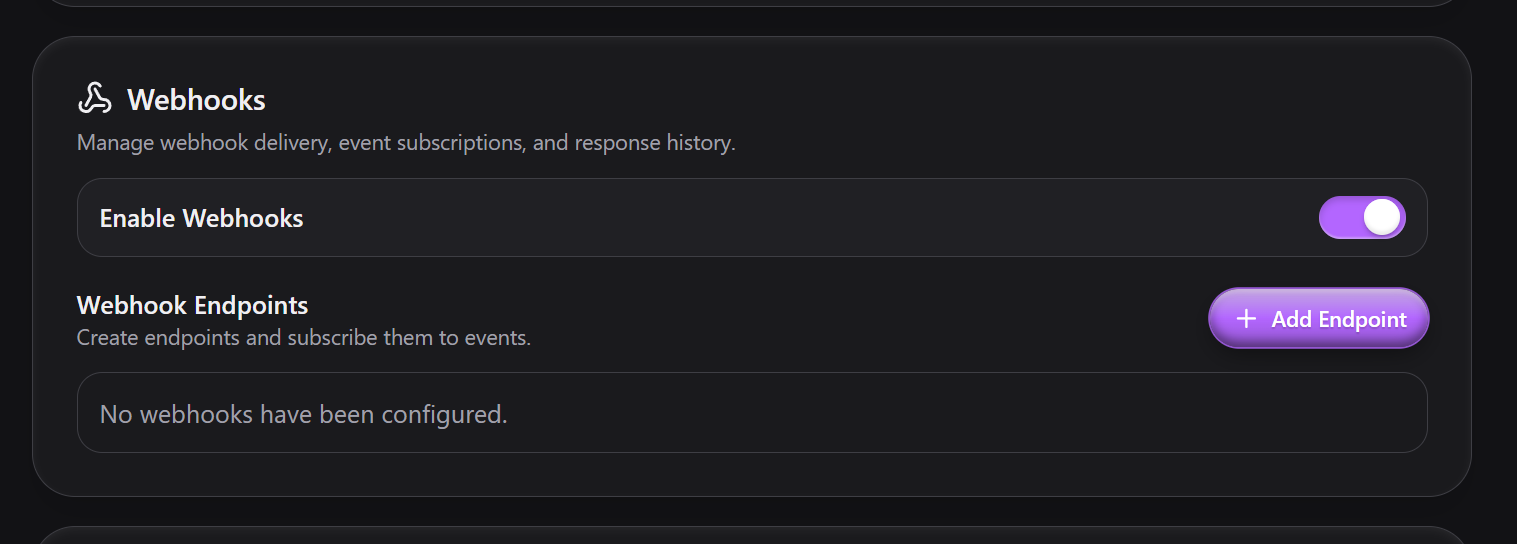
- Turn on Enable Webhooks. This is the account-wide switch; no endpoint fires while it is off.
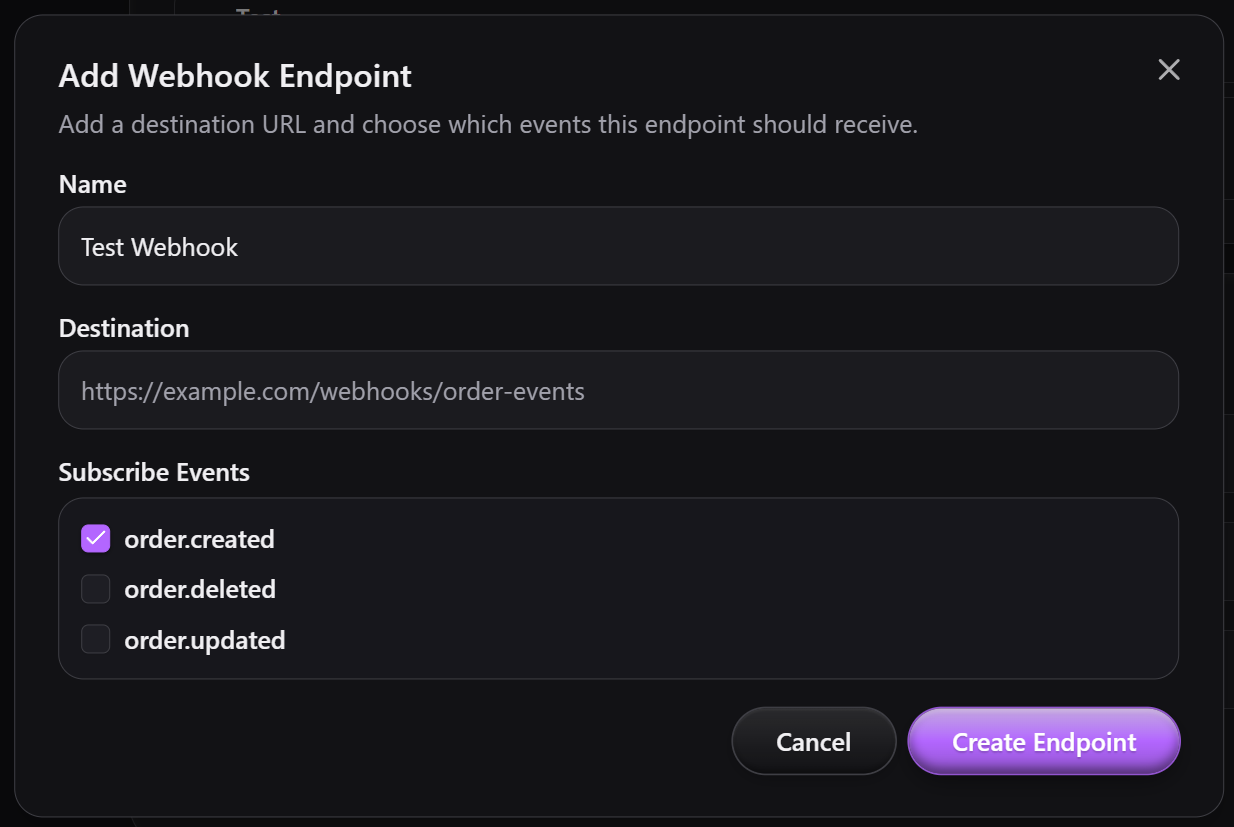
- Click Add Endpoint. Give it a Name (a label for you), a Destination
(your HTTPS URL), and check the events to Subscribe to (
order.created,order.updated,order.deleted). Click Create Endpoint. - Open the endpoint to manage it. The detail view shows its Signing Secret, which you copy into your receiver to verify deliveries (see Verify the signature). From here you can toggle the endpoint Enabled, change its Subscribed Events and Apply changes, or Delete it.
Activity
The endpoint's Activity table is every delivery attempt, newest first: the
delivery ID, Status (Success or Failed), HTTP Code returned by
your server, Event Type, and Timestamp. The Resend action on each row
re-queues that delivery with its original payload. Load 5 More pages back
through older deliveries.
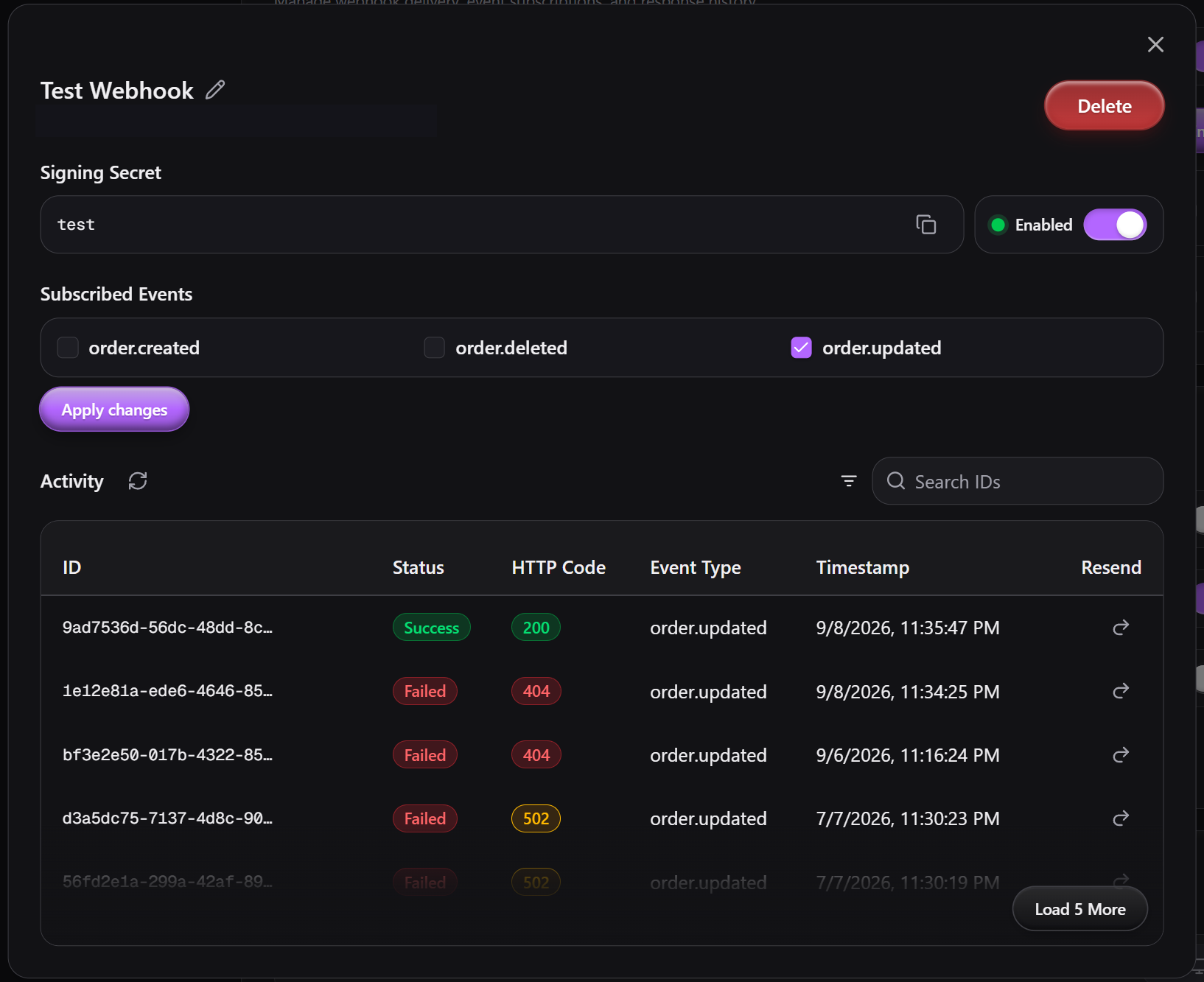
A Failed row with a 4xx code means your server rejected the request; a 5xx
or a missing code means it errored or timed out, and Cloud Slicer will retry it on
its own (see Delivery, retries, and failures).
Events
Three event types, all about orders:
order.createdfires after a new order is placed.order.updatedfires after any field on an order changes, including a status change tocancelled. A cancelled order still exists; only itsstatusmoved.order.deletedfires after an order is deleted. This is distinct from a cancellation: the record is gone, anddatacarries its last known state.
An endpoint receives an event only if it is in that endpoint's subscribed events, the endpoint is enabled, and the account's Enable Webhooks switch is on.
Payload
Every delivery is a JSON body with this shape:
Code
event_idis unique per event. Two endpoints receiving the same event share oneevent_id, and a retry keeps it, so it is the key to dedupe on.datais the whole order, the same shapeGET /v1/order/{order_id}returns. Orders documents every field, including the grouped line items (files,material,print_settings,priority,addons,estimate,pricing).- Keys are serialized sorted with no whitespace, because the signature is computed over these exact bytes.
Notable data fields:
data.totalis the final customer amount:subtotal - discount_amount + shipping_cost, each rounded half-up to two decimals.subtotalis the sum of each line'spricing.line_totalplusorder_base_feeandorder_priority_surcharge, the charges that belong to no single line. Discounts (rule or code, whichever is larger) are indiscount_amount. There is no tax field. See How totals are computed.data.priorityis computed: under aper_orderpriority scope, the name of the priority whose surcharge is charged; underper_item,null. Each line's own choice is inline_items[].priority.data.shipping_addressisnullunlessdata.shipping_selectedistrue. When set it hasfirst_name,last_name,company(nullable),address_line1,address_line2(nullable),city_locality,state_region(nullable),postal_code(nullable), andcountry.data.custom_order_idis your human-facing order number ({prefix}{n}), assigned at create time only if you have custom order IDs enabled in order settings, otherwisenull. It is a label. Every webhook and order API call keys ondata.order_id, not this value.data.customer_emailis always present. An order cannot be placed without a valid email, so orders never arrive without one.data.statusis one ofnew,in_progress,printing,completed,cancelled.
Verify the signature
Each POST carries these headers:
X-CloudSlicer-Signature-SHA256: HMAC-SHA256 of the raw body, hex encoded.X-CloudSlicer-Event-Id: matchesevent_idin the body.X-CloudSlicer-Event-Type: for exampleorder.updated.X-CloudSlicer-Attempt: the attempt counter, starting at1.
The signature is
HMAC_SHA256(key = signing_secret, message = raw_request_body).hexdigest(), where
signing_secret is the entire secret string shown for the endpoint, any
whsec_ prefix included. Compute it over the bytes you received, before any JSON
parse or re-serialization, and compare with a constant-time check.
There is no signature-scheme version header today. If the scheme changes, the new version will be announced before it ships.
Delivery, retries, and failures
A delivery counts as delivered on any 2xx. Return 2xx as soon as you have
stored the event and do slow work afterward. A non-2xx response, a connection
error, or exceeding the 30-second per-attempt timeout is a failure.
Failed attempts retry on a fixed ladder of 1m, 5m, 30m, 2h, for 5 attempts total (about 2.6 hours).
Retried (transient): connection errors, timeouts, and HTTP 408, 425,
429, and every 5xx (500, 502, 503, 504, …).
Not retried (terminal on the first failure): every other 4xx, including
400, 401, 403, 404, 409, 410, and 422. These mean your endpoint
rejected the request, so replaying it would not help.
A delivery that exhausts the ladder, or fails with a non-retryable code, stays listed in Activity and can be replayed with Resend.
Manage endpoints from the API
Everything the dashboard does is also on the API, under the same
Authorization: Bearer token as the rest of the API and gated to paid plans. Use
this to provision endpoints from your own tooling.
Create an endpoint with POST /v1/webhook/endpoint. name is optional and
is_active defaults to true. The response includes a webhook_id and the
signing_secret.
Code
GET /v1/webhook/endpointslists your endpoints;GET /v1/webhook/endpoint/{webhook_id}fetches one.PATCH /v1/webhook/endpoint/{webhook_id}updatesname,endpoint_url,subscribed_events, oris_active(all optional).DELETE /v1/webhook/endpoint/{webhook_id}removes it.GET /v1/webhook/deliveriesreturns every delivery, newest first, withstatus(pending,success,failed),http_code,attempt_count,next_attempt_at,delivered_at, and the stored request payload.POST /v1/webhook/delivery/retry/{webhook_delivery_id}re-queues one delivery, reusing its original payload andevent_id. This is the Resend button.
Push order updates back to Cloud Slicer
To reflect a change made in your own system, call PATCH /v1/order/{order_id}
with your Bearer token:
order_idis the Cloud Slicer default ID fromdata.order_id, notcustom_order_id.- Body fields, all optional, at least one required:
status,notes,deadline,shipping_selected,shipping_address,line_items. The order'spriorityis computed from the line items, so it is not an input. statusacceptsnew,in_progress,printing,completed,cancelled. There are no blocked transitions; any status can move to any other. Settingcompletedalso marks every line itemcompleted. Sendingline_itemsorshipping_selectedtriggers a full server-side recompute of the line totals,subtotal,discount_amount,shipping_cost, andtotal(see Update an order).
PATCH /v1/order/{order_id} returns a short acknowledgment (order_id,
updated_at), not the updated order. Call GET /v1/order/{order_id} if you need
the recomputed record.
An update through this endpoint fires order.updated to every subscribed
endpoint, including one that mirrors the change you just pushed. Dedupe on
event_id, or ignore an event whose data already matches your local state, to
avoid a sync loop.